A pitch tuner that listens to your horn.
Your horn has a colour of its own. AlphornTuner follows its natural harmonics to help you find your balance, note after note.

Reference points made for your instrument.
A chromatic tuner usually works with the twelve notes of equal temperament, like a piano. It shows the nearest note and the difference in cents.
The alphorn follows a series of natural harmonics. AlphornTuner takes that series as its reference, to go with your playing.
- The note names of your horn
- Tuning based on its harmonics
- The harmonic you are playing
The harmonics that give your horn its colour.
A cent is one hundredth of a semitone. These small differences are part of the colour of the horn. How they are heard varies with the ear and the listening conditions.
| Horn sound | Written note | Difference from the piano |
|---|---|---|
| H1 · H2 · H4 · H8 · H16 | C | 0 cents, with the same reference fundamental |
| H3 · H6 · H12 | G | +2 cents |
| H9 | D | +4 cents |
| H5 · H10 | E | −14 cents |
| H15 | B | −12 cents |
| H7 · H14 | B♭ | −31 cents, around a third of a semitone lower |
| H13 | A♭↑ | +41 cents |
| H11 | F↑ | Near the midpoint between F and F♯ |
The eleventh sound is the famous Alphorn F, called the Alphorn-Fa in German. This singular colour is a large part of the charm of the instrument.
Three reference points to move at your own pace.
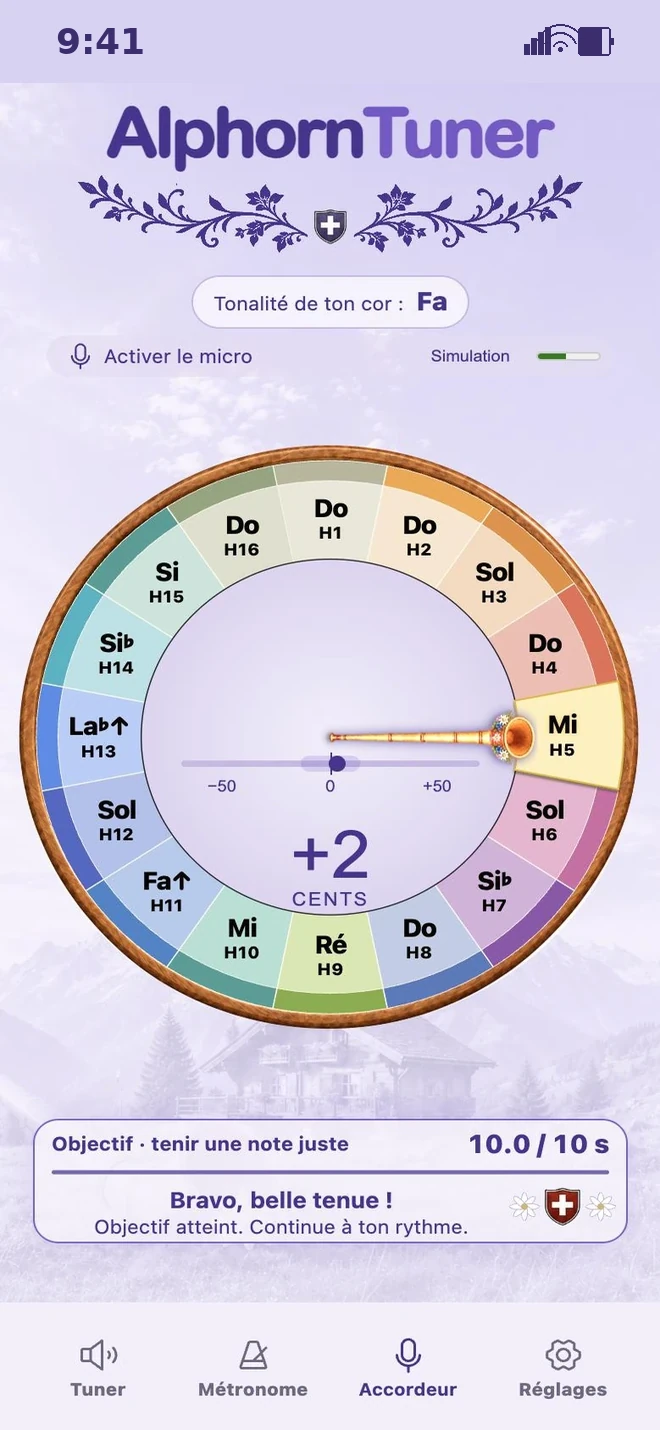
Spot your harmonic. The horn-needle turns towards it and fills up. You can see at a glance whether you are playing H5 or H10.
Find the centre of your note. The ruler shows your difference, from −50 to +50 cents. Choose the zone that suits you: ±5, ±10 or ±15 cents.
Enjoy holding your note. The counter keeps going as long as you stay inside the chosen zone. If you leave it for more than half a second, it starts again from zero. Pick it up calmly and look for a steady sound.
One simple setting for the low notes.
Low notes vibrate more slowly. Listening a little longer takes in more vibrations and helps to measure their pitch more closely.
Some tuners soften the movement of the needle with smoothing. The display becomes calmer, and the response is sometimes a little slower.
AlphornTuner lets you adjust the listening time: 85, 170 or 340 milliseconds. The “Measured sound length” setting lets you choose, with no smoothing of the display.
For a low note, try the “Long” length. Watch the needle and keep the setting that goes best with your playing.
Getting the most out of your pitch tuner.
Listen to the reference note first, then play it in your turn. The microphone pauses during the reference, so the pitch tuner does not measure its own sound.
Your sound stays on your device. The pitch tuner works with no audio recording, no history and no tracking of your progress.
The pitch tuner keeps to the natural series of your horn. If a sound is more than 100 cents away from every harmonic, it shows “Sound outside the natural series”. You can then simply play your note again, calmly.
Choose a quiet place to play if you can. In the tests described for this version, with the sounds of the app, around 3% of the readings were incorrect, mostly on H13. When it is very noisy, the display may pause. The pitch tuner stays a reference point that goes alongside your own ear.
Pick up your horn. Let a note sing.
Start with H5 or H7. Listen, adjust gently and enjoy letting the sound settle.
Open the Pitch tuner